

Have you ever looked at your hosting calendar and thought to yourself, “Well that’s a little odd that I don’t have any guests booked tonight”? Then, after a moment, you realize it’s because you weren’t actually accepting reservations for that night. Having an empty property means you’re leaving income sitting on the table, and for no good reason. Luckily, Airbnb and Host Tools work together to create handy unbookable night notifications to prevent this very situation from happening in the first place. This post explores what unbookable nights are, why they might be happening on your calendar, and how unbookable notifications ensure you won’t repeat this scenario ever again.
Host Tools provides an automated, unified calendar for short-term rental hosts, allowing you to seamlessly list on all major channels. Start your free trial today!
What are unbookable nights?

An unbookable night is a date on your calendar that guests couldn’t book, even though it isn’t blocked off. When this happens, hosts lose opportunities with guests and ultimately lower their income. Typically, a few reasons can cause this, and they’re easy to fix.
Why do unbookable nights happen?

There are three main reasons that unbookable nights unintentionally pop up on a host’s calendar. They are:
- A minimum night requirement is in place
Many hosts require guests to book multiple nights per reservation. Some hosts choose to do this to lower turnover costs or prevent parties from happening. As a result, you could end up with random two- or three-day gaps between two longer bookings.
For example, if you have a 5-night minimum stay requirement, you’d want to lower your minimum night requirement to 2 or 3 nights. Alternatively, you can choose to implement an orphan period. An orphan period will automatically lower minimum night stay requirements to try to fill these potentially awkward gaps between bookings.
- There are check-in restrictions
Another possibility for an unbookable night is check-in restrictions. This could happen if you have a rule such as “No Sunday check-ins” in place. To update those restrictions, hosts can edit their pricing rules with a Set Availability option of Blocked or any rule that disables check-ins, and update the day-of-week or date-range restrictions.
- You’ve set a check-out restriction
On the other side, you may have a check-out restriction in place. Like the above check-in restrictions, it’s possible that you have certain days blocked off for check-out or things on your calendar closed off for maintenance. To fix this, check your check-out booking rules and update them so your calendar no longer has a rule preventing check-outs.
How Host Tools and Airbnb work together
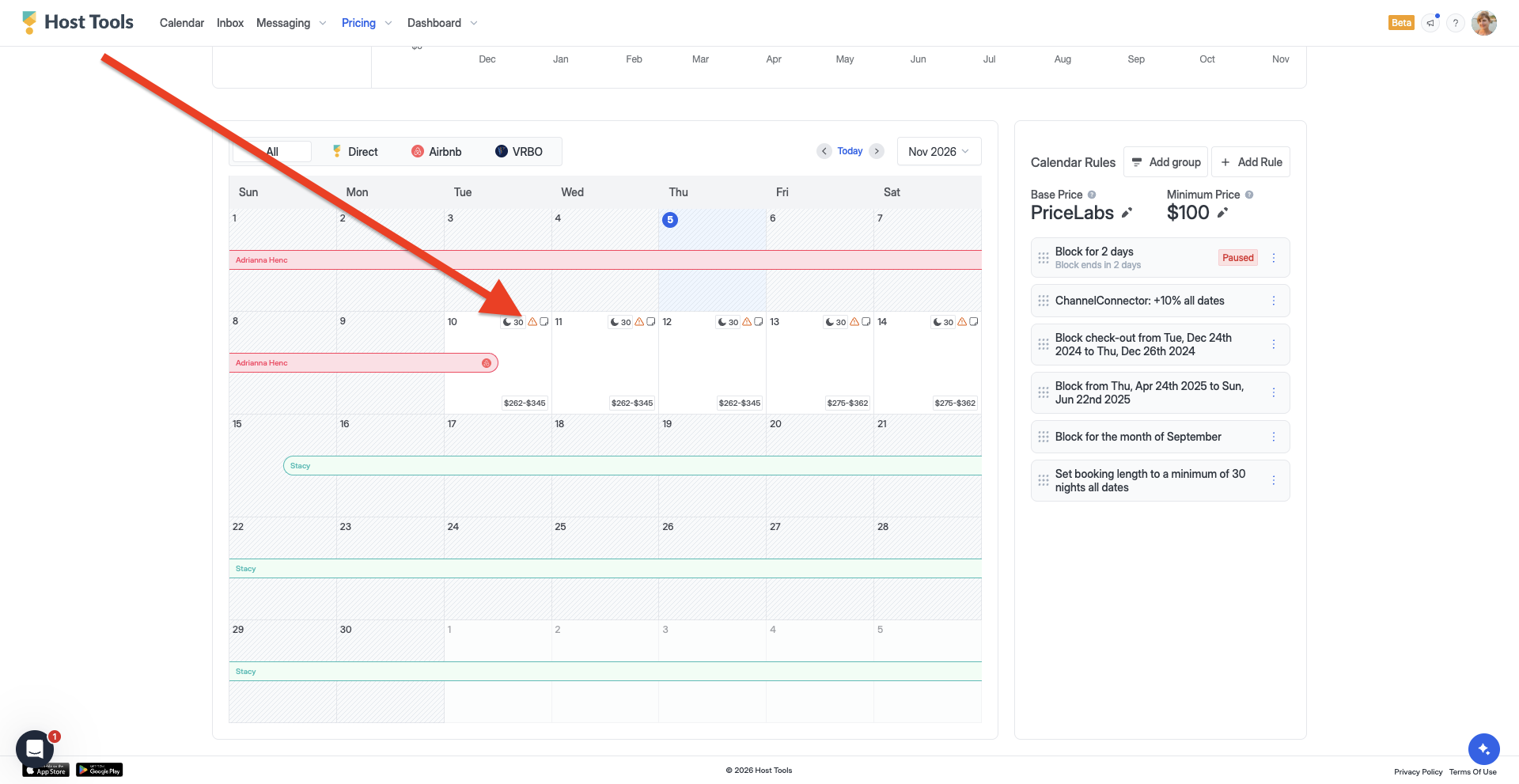
Obviously, you don’t want to leave when you notice any unbookable nights to chance. To address this, Host Tools created unbookable nights notifications that alert you to days on your calendar that are unbookable. If an unbookable night occurs, users see a warning icon (⚠️) on these dates. When a user hovers over the icon, they’ll see “Unbookable due to [reason].” For example, a user may see something like “Unbookable on Airbnb due to the minimum night requirement.” You can learn more about unbookable nights’ notifications via the Host Tools Help Center here.
Final thoughts
Ultimately, unbookable nights can be a thorn in our side as hosts. However, when you integrate your Airbnb listing with Host Tools, you’ll always be alerted when an unbookable night pops up unintentionally. Using our unbookable night notifications, you can focus on keeping your calendar full and not missing out on income.
Host Tools provides an automated, unified calendar for short-term rental hosts, allowing you to seamlessly list on all major channels. Start your free trial today!