

Consistently earning five-star reviews is the backbone of this industry. However, to regularly receive these reviews, you need to spot issues before they become a challenge. That’s where the Airbnb Quality Dashboard comes into play. As an Airbnb Preferred Partner, Host Tools brings this helpful Airbnb feature directly into your daily workflow. This guide covers what exactly the Airbnb Quality Dashboard is and how it helps short-term rental hosts like you every day.
Host Tools provides an automated, unified calendar for short-term rental hosts, allowing you to seamlessly list on all major channels. Start your free trial today!
What is the Airbnb Quality Dashboard?
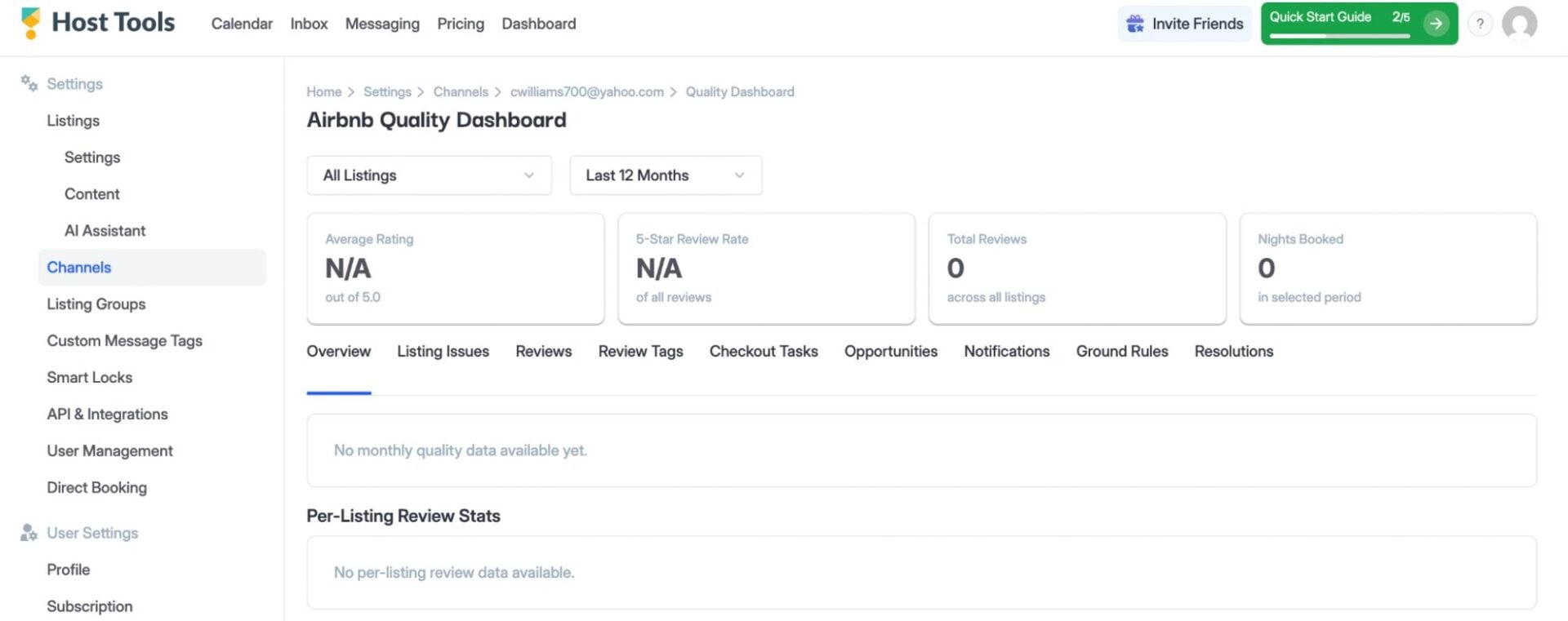
In short, the Airbnb Quality Dashboard is a centralized place that shows you the health of your listings. Using data such as guest reviews and ratings, the dashboard helps hosts identify items that need their attention. The purpose is to catch these challenges early so they don’t become larger or recurring issues that affect the long-term quality of your guest reviews and business. The Airbnb Quality Dashboard helps hosts identify items in the following categories:
- The overall quality of your listing
- Guest ratings
- Summaries of guest reviews
- Any issues with active listings
- Recommendations and opportunities for improvement from Airbnb
How does the Airbnb Quality Dashboard help hosts?

Ultimately, the Airbnb Quality Dashboard helps hosts catch small issues before they become major issues. For example, guests’ reviews might consistently note dissatisfaction with the quality of the Wifi signal. The dashboard will note this issue, and you can get a stronger internet connection before it becomes a long-term issue that lowers your reviews.
When you proactively catch these issues, you’re setting your listing up for more positive reviews. Ultimately, these strong reviews keep your listing compliant with Airbnb’s quality standards. As an example, if you want to maintain your Superhost status, you need to keep up your 5-star rating.
Lastly, the dashboard’s compatibility with Host Tools keeps you from constantly switching back and forth between platforms. This seamless integration is yet another way we save you time in your hosting experience.
What can you see inside the dashboard?
The Airbnb Quality Dashboard is filled with a variety of great stuff for your business. It includes the following:
- Overview: Just like it sounds, you’ll see a general overview of your listings’ performance.
- Listing issues: Under Listing Issues, you’ll see a centralized overview of specific areas of improvement for individual listings.
- Reviews: Here you’ll find your guest reviews.
- Review tags: Review tags categorize specific topics that the dashboard sees regularly coming up in guest reviews.
- Checkout tasks: These are the tasks that the guest sees and needs to be completed for the approaching check-out.
- Opportunities: Airbnb analyzes listings that may need some assistance and offers actionable solutions to help boost their ratings. This typically includes a variety of discounts you can consider offering.
- Notifications: These are real-time alerts to items that may need your attention.
- Ground rules: These are Airbnb’s basic rules for reliability, cleanliness, and accuracy.
Final thoughts

Providing a great guest experience isn’t just about responding when something goes wrong; it’s about staying one step ahead. The Airbnb Quality Dashboard gives you valuable insights into your listings so you can quickly identify trends, address potential issues, and continue delivering the experience guests expect.
By bringing the Airbnb Quality Dashboard directly into Host Tools, you can monitor your listing health without disrupting your workflow. It’s another example of how our Airbnb Preferred Partner status helps us deliver deeper Airbnb integrations that save you time while making it easier to maintain high-quality listings.
Host Tools provides an automated, unified calendar for short-term rental hosts, allowing you to seamlessly list on all major channels. Start your free trial today!